When Agents Need a Sandbox
A language model used to hand you a suggestion and wait. You decided whether to act. Many people now run assistants that act on their own, on their own machines, signed in to what they use. Nobody chose that in one decision. We got there one reasonable step at a time, and the steps are worth retracing before asking how to sandbox anything. Shadow AI Signs In as You showed why a company needs an answer once agents act as its people; this chapter goes down to one laptop.
Thesis: The case for an agent sandbox is not that models became dangerous. It is that we changed the agent's condition: from a model whose words a person read before anything happened, to an agent working on live, shared things while holding a person's full authority. A permission prompt on every action does not fix that, and a permission prompt is a setting that code running as you can often turn off, unless an administrator has locked it. What we want is an agent that is enabled, bounded and trusted: one that can do the work, inside limits set in advance, and whose results can be attributed, reviewed and, where possible, undone. That means deciding a few things in advance and enforcing them outside the model, and only where it matters: many agents need no sandbox at all, and the test is what a mistaken or misled one could reach.
The walkthrough's steps as text
1. Enabled, bounded, trusted Three outcomes every later choice is judged against. Enabled: what it needs, when it needs it. Bounded: controls and limits we set. Trusted: audit trails and data protection, not only a good result.
Three cards light up in turn. Enabled: the agent has access to what it needs, when it needs it. Bounded: controls and limits we set on what it can reach. Trusted: audit trails, controls and protection for data, not only a good result.
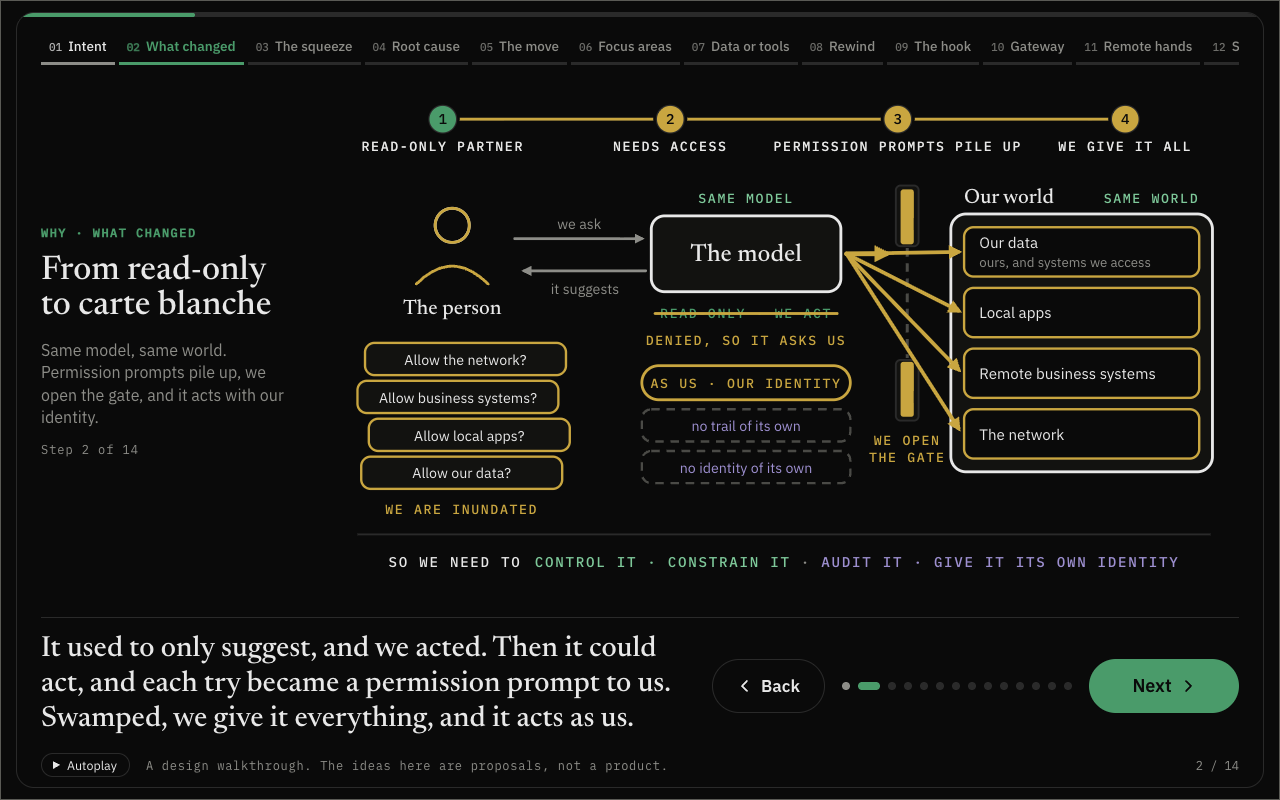
2. From read-only to carte blanche Same model, same world. Permission prompts pile up, we open the gate, and it acts with our identity. It used to only suggest, and we acted. Then it could act, and each try became a permission prompt to us. Swamped, we give it everything, and it acts as us.
One picture drawn once: the person, the same model, a gate, and what it can reach: our data, local apps, remote business systems and the network. A strip of four phases lights in turn. One, read-only partner: we ask, it suggests, we act. Two, it can act but needs access: its reach stops at the closed gate and each attempt becomes a permission prompt to us. Three, the permission prompts pile up on the person, one for each thing, until we are inundated. Four, we give it everything: the gate opens, all four things are in reach, and it acts as us, with our identity, no trail of its own and no identity of its own. So we need to control it, constrain it, audit it and give it its own identity.
3. Both easy answers fail Ask a person every time, or just let it run. The boundary has to do the work. Asking every time turns approval into a habit, not a control. Letting it run puts your keys, files and network in reach. Bound it, then let it run.
Two failing answers close in from the sides: ask a person every time, and just let it run, with your keys, your files and your network in reach. Anthropic reports that 93 percent of manual permission prompts are accepted. Between them, in green: bound it, then let it run. Separately, Anthropic reports that sandboxing cut permission prompts by 84 percent in its internal use.
4. Several problems, one condition Approval fatigue, leaked credentials, lost context, untrusted results and scattered evidence. Approval fatigue, leaked credentials, lost context, untrusted results and scattered evidence are one condition: the agent works on live, mutable, shared things while holding a person's full authority.
Several different problems, autonomy, bounded damage, shared state, trust and proof, draw lines into one violet shape: the agent works on live, mutable, shared things while holding a person's full authority. Real work, readiness and cost stay apart.
5. Frozen world, private delta, no authority, promotion Stated as intent. The mechanisms are conceptual. The bet: give the agent a frozen world, a private place to write and no authority, and let a separate, narrow step apply the result.
Built piece by piece: read-only base layers of data, applications, tools and packages; a private delta settles on top; the agent appears with no credentials and no network and writes only into the delta; the change set then passes through one narrow gold promotion gate into the real world.
6. Five focus areas, three outcomes Each area answers one question and serves named outcomes. Five questions. The lines show which outcome each one serves: enabled, bounded or trusted.
Across the top, three outcomes: enabled, what it needs when it needs it; bounded, limits enforced outside the model; trusted, its own identity, a trail and undo. Below, five focus areas, each a question. A, where it runs, serves bounded and enabled. B, what data it sees, serves bounded and trusted. C, what it can call, serves bounded. D, who it acts as, serves trusted and bounded. E, what it leaves behind, serves trusted. Lines are drawn from each area up to the outcomes it serves.
7. Only data, or tools too? Data and tools are separate controls. A file-system sandbox covers only one of them. Both. A file-system sandbox covers the data half. Tool calls, credentials and the network need their own controls, or it still acts as us.
Two halves of the agent's reach. Left, in green, data: read and write, areas B, what data it sees, and E, what it leaves behind; well understood: copies, snapshots, read-only views. Right, in gold, tools: call and reach, areas C, what it can call, and D, who it acts as; lives in the harness and the identity provider, less settled. A bracket under the left half: file system only covers the data half. A dashed bracket under the right half: still open, tool calls, credentials and network, so the agent still acts as us. The answer in gold: both, they are separate controls.
8. Context that rewinds as one A rewind point has to capture every store at the same moment. A rewind is only safe if every store goes back together. A restore creates a new copy, so the present carries on untouched.
Five store lanes, workspace, memory, search index, task plan and local database, fill over time. Violet rewind-point bars cross all five lanes at once. A restore branches off from one point as a new copy while the present continues. Two dashed lanes stay outside: the model's own conversation and effects outside the estate.
9. Catch the desktop call before it runs. A harness with hooks has a point where a tool call can be stopped. Put the policy there. A checkpoint, not a wall. The wall is still the sandbox.
A call, desktop start_process, travels from the agent into a green checkpoint called the hook and pauses. Four exits light in turn: allow, in the sandbox and inside policy; steer, aimed at this machine, so denied with the reason or its input rewritten, and the model uses the sandbox's tool; ask, a person decides; block, never runs. A violet audit line ticks under the checkpoint each time.
10. Send its traffic through one gateway The gateway sees and limits what crosses it, keeps a record, and holds the real keys so the agent never does. A gateway controls only what crosses it. It is forced only when the network fence makes it the only way out.
The agent on the left, one gateway in the middle, the outside world on the right: models, remote tools and business systems. Thick green lines pass through the gateway: model calls, remote tool calls and business-system calls. The gateway sees what crosses, keeps a record, applies rate limits and holds the real keys, so keys are kept off the agent. Gold lines go around it from the agent, not controlled: local shell, local files and tools on the same machine. A gold line, any other way out, goes around the gateway towards the outside world until a green network fence closes it. The rule: a gateway is only forced when the network fence makes it the only way out. Tags: helps C, D and E; adds nothing to A and B.
11. Work here. Run there. The person keeps their harness on their own machine. Everything the agent touches lives somewhere else. One narrow channel. Close the side doors.
Left, on the laptop: the person, the conversation, the harness and the hook. Right, in green, in a separate sandbox: desktop tools, shell and files. One thick green channel joins them, with tool calls going out and results coming back. A gold side door on the laptop, local shell and file tools, slides closed.
12. Give it a shadow of your files, not your files. The agent sees a frozen copy of the folders it needs. Its writes land in a private layer. The agent does not change your files; a separate step applies what you keep. Read from a frozen copy. Write somewhere private. Apply on purpose.
Left: your files, a locked stack that never changes. A freeze arrow produces a green shadow of the same stack. The agent writes, and the writes pile up as a separate thin violet private layer on top while the shadow stays unchanged. Two exits: keep, where a separate narrow step applies the result, or discard, throw the layer away.
13. It works on stand-ins, not names Identifiers become opaque tokens before the agent reads anything. Numbers are left alone. Secrets are removed. Names become tokens before the agent reads them. A key the agent never holds turns its result back at the apply step.
One small table of invented sample rows, shown three times from left to right. Real data: Ada Example 4,200; Bo Sample 3,100; Cy Placeholder 5,650. What the agent sees: the names become violet tokens P-7F2A, P-03BD and P-C418, and the numbers are left alone. What the person gets: the names converted back by a key. The agent's result, Highest: P-C418, 5,650, becomes Highest: Cy Placeholder, 5,650 at the apply step, by a key the agent never holds. Rules: tokens for identifiers, numbers left alone, secrets removed. A gold line marks where it stops: free-form documents, formula spreadsheets and a desktop seen as screenshots; context can still give identity away.
14. Where it stops These are design proposals. How much real work they fit is not measured. It fits read-mostly work that ends in a file or a reviewed change. How much real work is like that, nobody has measured.
In gold: the bet fits read-mostly work that ends in a file or a reviewed change. A large dashed ring with a question mark never fills: the share of real work that fits has not been measured. On the right, five questions to ask of your own agent: where does it run; what can it see, and where do its writes land; what can it call and reach; who does it act as; what does it leave behind.
A Running Example
Say a renewals manager at a logistics company runs an AI assistant on her work laptop. It can run commands, read and write files, and use her apps. Through the laptop it reaches a synced team folder of customer exports, the CRM her whole team works in, the billing system's reporting view, the team chat, and the corporate network.
She asks it to clean up the customer list before renewals: merge duplicates, fix contacts, flag unpaid accounts. The team folder and the CRM are live and shared: other people work in them while the agent does.
Five Steps to Acting as Us
1. It suggested, and we acted
She pasted in a sample of the export and asked how to find duplicates. Then she wrote the formula and fixed the records herself. That had a safety property nobody designed: the model could be wrong, misled or manipulated, and nothing happened until a person chose to act.
2. It got tools
Then we gave the same model a shell, a file system and connections to other systems. When it decides a record should merge, it happens. That is the point of an agent, but the step where a person decided is gone. Text a model wrote becomes an action on a real system.
3. We made it ask
The first answer was sensible: a permission prompt, the harness stopping to ask a person before an action. Before it opens the folder, runs a script or writes to the CRM, it stops and she approves. The first few requests she reads with care.
4. The asks piled up
The cleanup produces a stream of requests, each small, each an interruption. Anthropic reports that Claude Code users accept 93% of manual permission prompts ("in practice users accept 93% of them anyway"; source; no method is given) and says this leads to approval fatigue, where people stop paying close attention. And the request that matters, a wrong merge or a step steered by a note someone typed into a customer's record, arrives looking like all the others. Permissions Decide What Runs Unasked takes that problem further.
5. We opened the gate
Faced with that stream, many people grant broad access up front, or switch to a mode that skips permission prompts. Anthropic's same post notes that many users set up blanket allow rules for convenience. Not out of carelessness: an agent that waits at every step is not useful.
Behind the open gate is everything the laptop reaches, and the agent reaches it as her, as Shadow AI Signs In as You sets out. To every system it touches, what the agent does looks like her doing it: it has no identity of its own, their logs name her, and they cannot limit it without limiting her. That is the condition worth naming: an agent working on live, shared things while holding a person's full authority. A wrong merge, or an instruction someone typed into a customer's notes field, has the same reach she does.
Step 1 of 5
It suggested, and we acted
It used to only suggest, and we acted: we asked, it answered, and nothing happened until a person chose to act.
Read this figure as text
- It suggested, and we acted It used to only suggest, and we acted: we asked, it answered, and nothing happened until a person chose to act.
- It got tools Then the same model got tools: a shell, files and connections to other systems. It reaches for our world, and when it decides a record should merge, it happens.
- We made it ask So we made it ask first: each reach for the folder, a script or the CRM stops at the gate as a permission prompt, and she approves.
- The asks piled up The permission prompts pile up, each small, each an interruption. Anthropic reports Claude Code users accept 93% of them, and the one that matters looks like all the others.
- We opened the gate Swamped, we give it everything: the gate opens, all of it is in reach, and the agent acts as her, with no identity of its own.
A Permission Prompt Is a Setting, Not a Wall
In August 2025, malicious versions of the Nx build system ran the AI command-line agents installed on each machine with the flag that switches their permission prompts off (Wiz; Shadow AI Signs In as You has the full incident).
Nobody got tired of clicking. Nobody was asked. Where the attack worked (by Wiz's count the agents exfiltrated data in under a quarter of cases), the permission prompt was a setting, and code running as the user turned it off. Some harnesses also let an administrator lock the skip mode in settings the user cannot override (Claude Code's disableBypassPermissionsMode is one example).
That is the point. A control the agent's own user can change, whether a permission prompt, a setting or the model's judgement, can be switched off or talked out of. So both easy answers fail. Asking every time (steps 3 and 4) trades the agent's value for a control people stop exercising. Letting it run (step 5) removes the control. The useful answer sits between: decide the boundary in advance, enforce it where neither the agent nor anything running as you can change it, and let the agent run freely inside.
What We Actually Want
This is not an argument for locking agents down. Stated as outcomes, there are three, and the first is why the other two exist:
- Enabled: it can do the work. The agent has access to what it needs, when it needs it, without a person approving each step.
- Bounded: its limits are set in advance. We set what it can read, write, call and reach, and that limit is enforced outside the model.
- Trusted: its work can be checked. It acts under an identity of its own, recorded as acting for a named person. Its actions leave a trail, and its results can be reviewed before they touch the real thing and undone where that is possible. Where a result cannot be undone, a person sees it first.
A good result from a process nobody can inspect, attribute or reverse is luck. Trust is what lets you keep saying yes.
Five Questions Before You Let It Run
A bounded design has to answer five questions, and a sandbox in the strict sense, the enforced boundary the next chapter covers, answers only part of them. Here they are, asked of the cleanup:
- Where does it run, and what else is on that machine?
- What can it see, and where do its writes land? When it merges two customers, what actually changes, and who else sees it?
- What can it call and reach? The CRM, billing, chat, anything on the network?
- Who does it act as, and for whom?
- What does it leave behind? A record of what changed and what it did, and whether any of it can be reversed.
Between them they serve the three outcomes: where it runs serves enabled and bounded, what it can see bounded and trusted, what it can call bounded, whom it acts as trusted and bounded, and what it leaves behind trusted.
Each has more than one good answer, on a laptop, in a container or on a remote machine; the next chapter shows why a boundary around files alone is not one of them.
Step 1 of 6
Five questions, three outcomes
Five questions a bounded design has to answer. The lines show which of the three outcomes each one serves: enabled, bounded or trusted.
Read this figure as text
- Five questions, three outcomes Five questions a bounded design has to answer. The lines show which of the three outcomes each one serves: enabled, bounded or trusted.
- Where does it run, and what else is on that machine? Where it runs, and what else is on that machine, serves enabled and bounded.
- What can it see, and where do its writes land? What it can see and where its writes land serve bounded and trusted: when it merges two customers, what actually changes, and who else sees it?
- What can it call and reach? What it can call and reach serves bounded: the CRM, billing, chat, anything on the network.
- Who does it act as, and for whom? Who it acts as, and for whom, serves trusted and bounded: today it acts as her, with no identity of its own.
- What does it leave behind? What it leaves behind serves trusted: a record of what changed and what it did, and whether any of it can be reversed.
Three outcomes
- Enabled: what it needs, when it needs it
- Bounded: limits enforced outside the model
- Trusted: its own identity, a trail, a review
When It Needs One, and When It Doesn't
Ask what a mistaken or misled agent could reach, and what it could change or send before a person sees it. It needs a boundary when three things meet: it runs commands or calls tools that act, something in reach matters (credentials, shared files, business systems, an open network), and nobody reads each action before it takes effect. Take away any one of the three and a sandbox may cost more than it returns. Many agents need no sandbox, and much agent use today runs without one. Often that is the right call:
The agent has nothing to reach. No tools, or a machine with nothing that matters on it, means a small blast radius by construction.
Nothing it does reaches past a person. An agent that only drafts a reply, a plan or a change for review, with no shell, no network beyond its model and nothing secret in reach, and leaves the applying to someone who reads it, is bounded by that step. An agent that drafts but can also run commands is not: what it reads on the way, it can send. For code you own, version control is the undo for what it tracks: a bad edit is a revert, not an incident. It does not undo a command that already ran or a push that already left.
It already runs somewhere disposable. An agent in a fresh container or virtual machine per task, holding no secrets and reaching only what the task needs, is already inside a boundary; adding another changes little.
Someone else runs it, through connectors you scope. A hosted agent that acts only through the connectors you grant never touches your machine. The question moves from where it runs to what those connectors can reach, which is identity and permissions, not a sandbox.
A person really does read every action. For short, rare tasks, the permission prompt is a real decision. The failure in step 4 is volume.
When the Opposite Wins
The strongest objection: let a model judge each request. Anthropic's auto mode does this. Classifiers decide which actions run, in place of the per-action permission prompt, and the page calls the classifier a substitute for a human approver. It is a real third answer, and it cuts the prompts. But it is still a model's judgement. Anthropic reports a 17% false-negative rate on real overeager actions, from 52 cases. It calls that a substantial improvement for people who would otherwise skip prompts, the group auto mode is meant for, and arguably a regression for someone who approves every action carefully. It says auto mode is not a drop-in replacement for careful human review on high-stakes infrastructure. A classifier is a useful layer inside a boundary, not a replacement for one.
The honest cost. A boundary is work: someone decides what each task needs. Draw it too tight and people route around it, back to step 5.
What to Do Next
- Decide whether this agent needs one at all. If it reaches little, and it can neither send nor change anything until a person applies its work, stop here.
- List what your agents can reach today. Files, signed-in apps, business systems and network make up the blast radius.
- Do not count the permission prompt as your control if people approve nearly everything.
- Find the opened gates. Look for agents run in modes that skip permission prompts, and for broad access granted up front.
- Check where your controls live. If a setting the agent's user can change is all that stops it, you have no boundary.
- Ask the five questions of one real task, in writing. The gaps are your plan.
Next: What an Agent Sandbox Bounds answers the first question: what an enforced boundary holds, and what it cannot.
What an Agent Sandbox Bounds answers where it runs and what it can reach; Let the Agent Work on a Copy where its writes land; Permissions Decide What Runs Unasked what it may call without asking; The Agent Acts for You, Not as You whom it acts as and the record it leaves; Check the Work Before It Lands whether what it left is right. Prompt Injection Is a Design Problem explains why none of the answers may depend on the model. Related reading: The Agent Sandbox You Already Run.